Comfort · Workspace · Workstation fit
Check Whether Your Chair and Desk Can Work Together
A chair can fit your body and still fail at the desk. This stage checks whether the required chair setting leaves enough leg room, reaches a usable keyboard and mouse height, clears drawers or desk aprons, and lets the chair approach the work surface without armrest or thigh interference.
The goal is not to force one “ideal desk height.” It is to find a workable relationship between this person, this chair, this work surface and this task.
CHAIR + DESK COMPATIBILITY
Quick Answer
Start from the body-fit chair setting rather than changing the chair simply to match the desk. Then check five things together: work-surface/input height, underside leg clearance, chair approach, keyboard-and-mouse reach, and foot support. If the desk is fixed and too high, a higher chair setting may require a footrest. If the desk is too low or blocked by drawers/aprons, the workstation itself may be the limiting part.
Record the workstation constraints before judging the chair
Measure the actual setup you use. Marketplace desk dimensions, nominal “standard height” labels and generic room measurements are not substitutes for the usable geometry at your keyboard and knees.
01 · Work surface
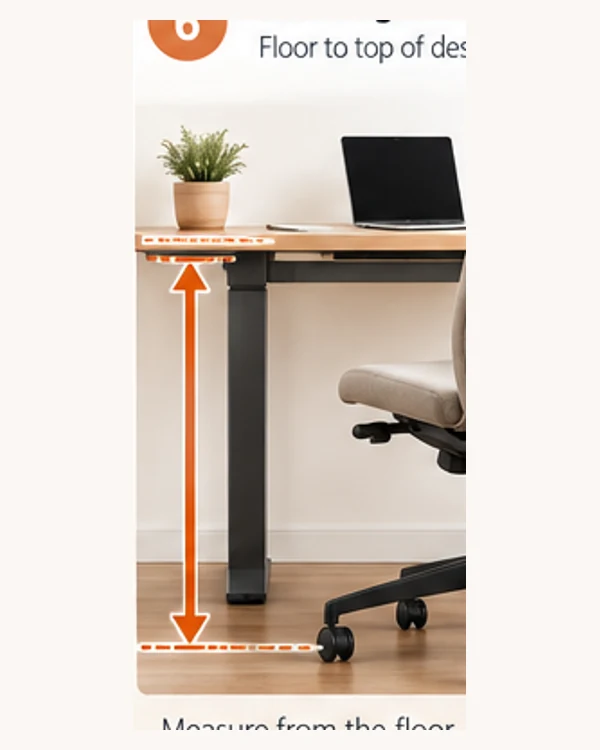
Desk or keyboard/input height
Record the floor-to-surface height where your hands actually work. If you use a keyboard tray, its height matters more than the top of the desk for keyboard-and-mouse tasks.
02 · Clearance
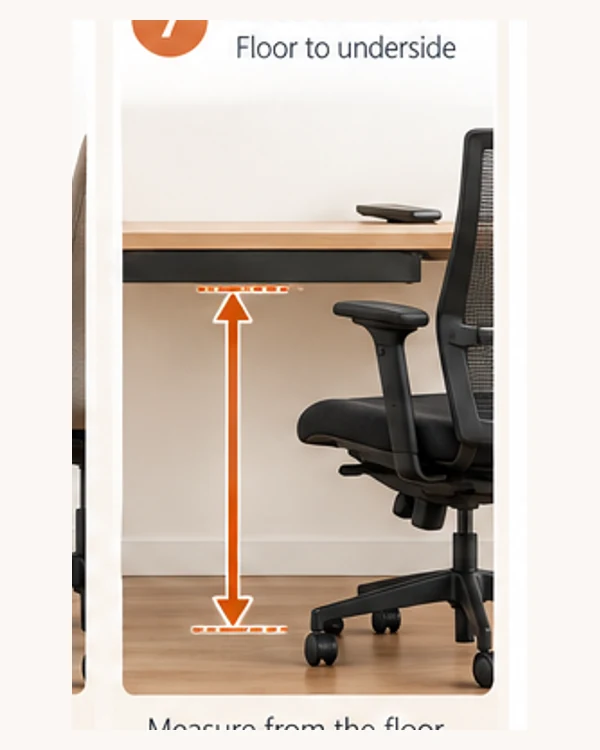
Usable underside height and depth
Measure the lowest obstruction under the desk and the forward space available for thighs, knees, legs and feet. Drawers, aprons and cable trays can reduce usable clearance.
03 · Approach
Armrest and chair collision points
Check whether the armrests, seat, frame or controls stop the chair from getting close enough to the keyboard or work surface.
04 · Reach
Keyboard and mouse position
Confirm that both devices can stay close enough for relaxed shoulders and elbows, without forcing repeated forward reach or moving the mouse far away from the keyboard.
05 · Support
Footrest availability and usable space
If a fixed desk requires a higher chair setting, confirm that both feet can still be supported on the floor or on a stable footrest that fits under the desk.
06 · Task context
Fixed desk, adjustable desk or mixed work
Record whether the work surface can move. A height-adjustable desk gives a different solution path from a fixed desk, and laptop-only work may need separate keyboard/mouse support.
Five compatibility gates
Do not average these into a score. A mandatory failure can make the setup unsuitable even if the other checks look good.
Gate 1 · Working height
Can the input surface meet relaxed elbows?
With the chair set for body fit and feet supported, check whether the keyboard/input surface can be used with relaxed shoulders, elbows close to the body and forearms in a comfortable near-horizontal relationship.
- PASS: a workable chair + input-surface relationship exists.
- CONDITION: workable with a keyboard tray, desk adjustment or footrest.
- UNKNOWN: actual input-surface height is not recorded.
- FAIL: the fixed geometry forces persistent shoulder elevation, excessive reach or loss of foot support.
Gate 2 · Leg clearance
Can thighs, knees, legs and feet fit under the desk?
The usable opening matters, not only the desk-top height. Check the lowest obstruction and enough forward space to move the legs and get close to the input devices.
- Drawers and aprons can turn an otherwise tall desk into a low-clearance desk.
- Do not accept regular thigh contact with the underside.
- A narrow opening can also restrict chair position and movement.
Gate 3 · Chair approach
Can the chair get close enough without collision?
Armrests can fit your elbows yet still hit the work surface. Check the chair at the actual height you need, because armrest and desk relationships change when the seat height changes.
- Lower/remove armrests only if doing so still supports the intended use case.
- Do not compensate by leaning forward all day.
- Check controls, frame and seat edge—not only armrests.
Gate 4 · Input reach
Can the keyboard and mouse stay close?
Keyboard and pointing-device placement should let the user keep the elbows close and avoid repeated overreach. A mouse forced to a distant desk area because a tray is too small is a workstation problem, not a chair problem.
Gate 5 · Foot support
Can the user keep stable support after desk alignment?
A fixed desk may require the chair to be raised so the elbows align with the work surface. If that removes floor contact, verify that a stable, appropriately sized footrest can support both feet without blocking leg clearance.
Interpret the workstation result
Do not make the chair compensate for a bad workstation
- Do not lower a correctly fitted chair until the knees are cramped just to fit under a drawer or apron.
- Do not raise a chair for a high fixed desk and leave the feet unsupported.
- Do not keep armrests at a poor height only because they need to slide under the desk.
- Do not move the keyboard or mouse far away simply because the desk lacks usable input space.
- Do not treat monitor height as a reason to distort chair or keyboard geometry; screen positioning is a separate adjustment.
Boundary: this page evaluates chair–desk compatibility. It does not diagnose pain or prescribe treatment. Persistent symptoms, neurological signs or significant limitations need appropriate professional assessment.
Fixed desk vs adjustable desk: the decision changes
Fixed-height desk
Set the chair for the person first, then test whether the work surface is reachable without losing foot support or leg clearance. When the desk is too high, a footrest or keyboard tray may solve the mismatch. When it is too low or structurally blocked, the desk may be the item that needs changing.
Height-adjustable desk
After establishing the body-fit chair setting, adjust the work surface to meet the user rather than forcing the chair away from a supported position. Still verify underside clearance, input reach and any crossbar/cable-tray interference.
India-specific verification before buying a desk or chair
For products sold in India, keep ergonomic fit and product-compliance verification separate. BIS currently lists IS 17631:2022 — Work chairs and IS 17633:2022 — Tables and desks within the Furniture Quality Control framework. Certification or marking claims should be checked against the exact product/model and current applicability rather than inferred from a marketplace title.
The table/desk standard addresses performance and safety, including strength, stability, durability and dimension-related requirements. It does not prove that a particular desk will fit your body, chair or room. Workstation compatibility still requires the measurements above.
Decision worksheet
Record the desk evidence beside the chair setting
| Check | Your setup | Evidence / measurement | State |
|---|---|---|---|
| Input/work-surface height | _____ cm | Chair seat setting _____ cm | PASS / CONDITION / UNKNOWN / FAIL |
| Usable underside clearance | _____ cm | Lowest obstruction: __________ | PASS / CONDITION / UNKNOWN / FAIL |
| Chair approach | Clear / collision | Armrest or frame point: __________ | PASS / CONDITION / UNKNOWN / FAIL |
| Keyboard + mouse reach | Near / extended | Tray / desktop / other | PASS / CONDITION / UNKNOWN / FAIL |
| Foot support | Floor / footrest | Stable support available: Yes / No | PASS / CONDITION / UNKNOWN / FAIL |
Keep this with your body measurements and chair-fit record. The next comparison stage should only compare chairs that remain compatible after both FIT and WORKSTATION checks.
Sources & Methodology
This page uses current occupational-ergonomics guidance for workstation relationships and current BIS standards context for India. Calmivora converts those principles into a consumer decision workflow; it does not present one desk height or posture as universally correct.
- U.S. Occupational Safety and Health Administration — Computer Workstations eTool. Used for neutral-posture goals, adequate thigh/leg clearance, foot support, armrest interference and keyboard/mouse reach. Source.
- Canadian Centre for Occupational Health and Safety — How to Adjust Office Chairs. Used for the fixed-height desk decision: chair adjusted for the person first, then work-surface relationship and footrest dependency checked. Source.
- Canadian Centre for Occupational Health and Safety — Keyboard Selection and Use. Used for keyboard/mouse placement, relaxed shoulders and elbow relationship. Source.
- Bureau of Indian Standards — Furniture Quality Control / IS 17631:2022 and IS 17633:2022. Used only for current Indian product-compliance context; ergonomic fit remains a separate decision. Source.
Last reviewed: September 2026. Product and certification claims can change; verify exact models and current applicability before relying on a compliance claim.
Next stage
Now evaluate the adjustments that matter for your work pattern
You now have three evidence layers: your measurements, body-to-chair fit, and chair-to-desk compatibility. The next stage evaluates lumbar/back support, recline/tilt, armrest directions, seat sliders, base/castors and other adjustments only when they solve a defined need.