Chair decision · Measure
Measure Yourself for a Chair
Before comparing chair models, record a small set of body measurements that affect seat height, seat depth, seat width, armrest position and load compatibility. The goal is not to calculate one “perfect chair size.” It is to create reliable inputs for the next fit check.
Use centimetres for body and workstation dimensions, kilograms for body weight, and measure twice when possible.
Quick Answer
Record five inputs: popliteal height, buttock-to-popliteal length, seated hip breadth, seated elbow height and body weight. These are used later against the exact chair’s adjustment ranges and load evidence. A body measurement is not copied directly into a chair specification without checking the desk, footwear, foot support and usable adjustment range.
Measure the person first — then note the desk constraints
Use this visual as a quick reference. The five body measurements are the inputs for the FIT stage; the desk-height and knee-clearance panels preview the separate WORKSTATION stage that follows.
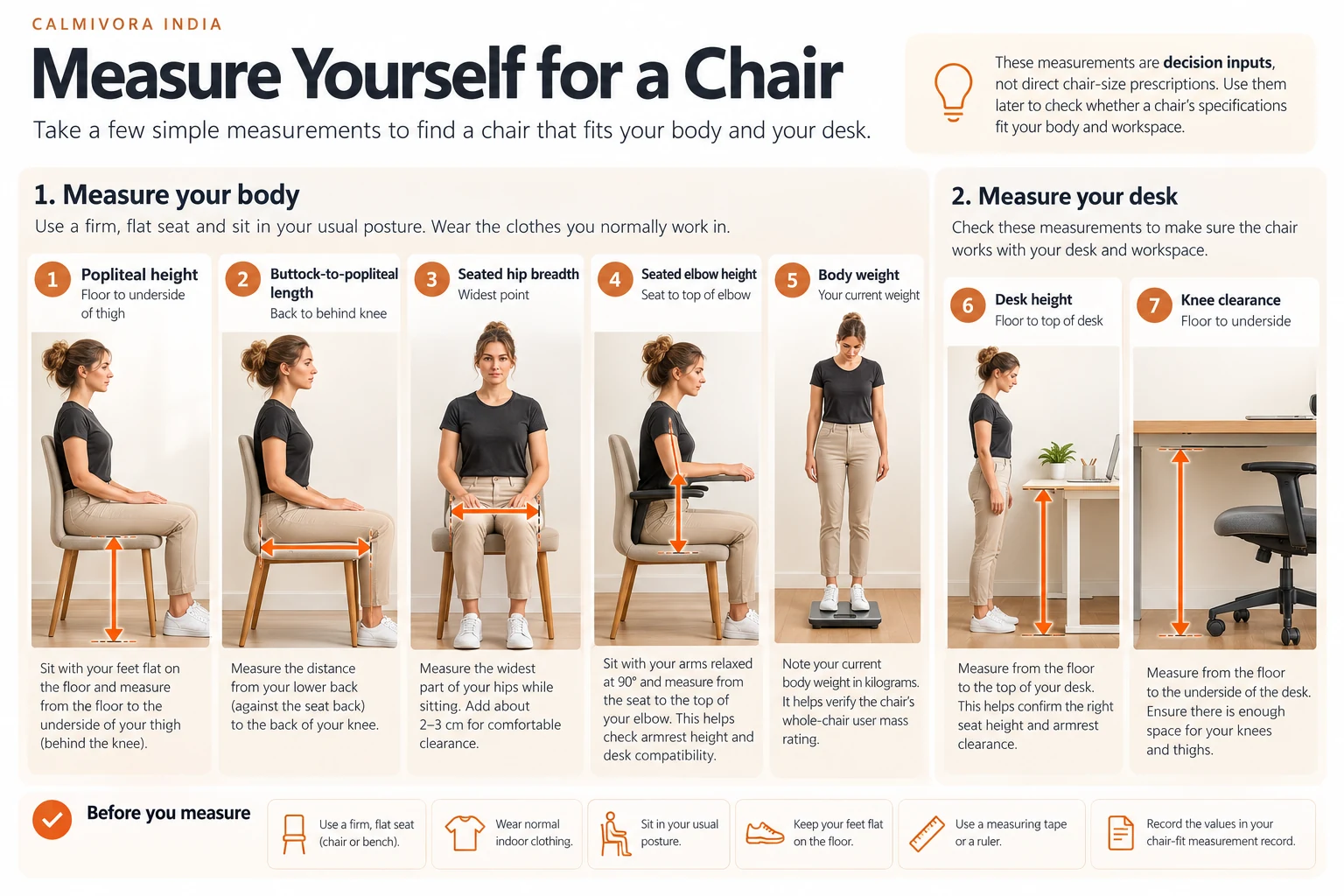
The human model is used only to demonstrate measurement positions. Use your own measurements; do not infer chair fit from body shape, standing height or appearance.
Set up before you measure
- Use a firm, level seat rather than a deep sofa or thick cushion.
- Wear the footwear you normally use at the desk if it materially changes heel height.
- Keep both feet supported and the lower legs in a natural, near-vertical position.
- Sit upright without forcing a rigid posture; keep the shoulders relaxed.
- Use a rigid tape or ruler where practical and ask another person to help with side-view measurements.
- Measure twice and record the value in centimetres.
How to take each measurement
A · POPLITEAL HEIGHT
Floor to the underside of the thigh behind the knee
- Sit with the feet fully supported and the lower leg close to vertical.
- Keep the thigh approximately level and avoid lifting the heel.
- Measure vertically from the floor or foot-support surface to the underside of the thigh immediately behind the knee.
Used later for: checking whether a usable seat-height setting exists while keeping the feet supported and the workstation relationship workable.
B · BUTTOCK-TO-POPLITEAL LENGTH
Back of the buttock to the hollow behind the knee
- Sit fully back against a vertical reference or firm back support.
- Keep the knee comfortably bent and the thigh supported.
- Measure horizontally from the rearmost buttock position to the hollow at the back of the knee.
Used later for: checking effective seat depth and whether the user can sit against the backrest without the seat edge pressing into the knee area.
C · SEATED HIP BREADTH
Widest point across the seated hips and thighs
- Sit naturally with weight distributed evenly on the seat.
- Do not pull the knees tightly together or spread them unusually wide.
- Measure the widest horizontal breadth across the seated hip/thigh area.
Used later for: checking usable seat width and whether the chair provides room to sit and change position without being constrained.
D · SEATED ELBOW HEIGHT
Seat surface to the relaxed elbow
- Sit upright with shoulders relaxed and the upper arms close to the torso.
- Bend the elbows to about a right angle without shrugging the shoulders.
- Measure vertically from the seat surface to the underside/lowest point of the elbow.
Used later for: checking whether the armrest range and desk/work-surface height can support relaxed shoulders without forcing the elbows upward.
E · BODY WEIGHT
Record your current body weight in kilograms
Use a reliable household scale and record the current value. Calmivora uses body weight only against a verified whole-chair maximum user-mass rating for the exact configuration.
A gas-lift test value, base test, marketing phrase such as “heavy duty,” or rating from a different chair variant does not substitute for the complete-chair user-mass rating.
Do not turn these measurements into chair targets by themselves
The measurement stage only records the person. The next stage asks whether the chair’s actual adjustment range can accommodate that person while also working with the desk.
- A popliteal height of 45 cm does not automatically mean “buy a chair with a 45 cm seat height.” Footwear, seat compression, desk height and footrest use can change the usable setup.
- Buttock-to-popliteal length is compared with effective seat depth, including any seat-slider range, not just the longest dimension in a product title.
- Seat width must be a usable internal width. Overall chair width or arm-to-arm external width is not an acceptable substitute.
- Seated elbow height matters together with armrest range and desk clearance. More armrest directions do not automatically mean a better fit.
- Body weight is checked against whole-chair evidence, not a component test capacity.
How each input maps to the chair decision
Popliteal height
→ seat-height range
Then checked with foot support and desk/work-surface height.
Buttock-to-popliteal length
→ effective seat depth
Then checked for thigh support and clearance behind the knee.
Seated hip breadth
→ usable seat width
Then checked for comfortable clearance and freedom to change position.
Seated elbow height
→ armrest + desk relationship
Then checked for relaxed shoulders and desk approach.
Body weight
→ whole-chair user-mass rating
Only when the exact configuration’s rating is verified.
What not to use as a shortcut
- Standing height alone: people of the same height can have different lower-leg, thigh, hip and seated-elbow dimensions.
- Clothing size: it is not a substitute for seated hip breadth.
- A chair’s recommended-height marketing range: use it only as secondary context unless the underlying dimensions and adjustment ranges are available.
- One quick “finger gap” rule: use physical comfort checks as confirmation, but keep the recorded dimensions for product comparison.
Record your inputs
Chair-fit measurement record
Keep this record. The Chair Fit stage will compare it with exact product dimensions rather than asking you to remember the numbers.
Sources & Methodology
This measurement guide converts general workstation-fit principles into a consistent Calmivora input method. It does not diagnose pain, prescribe treatment or claim that one body measurement determines a chair size.
- U.S. Occupational Safety and Health Administration — Computer Workstations eTool. Used for seat-height, seat-depth, user-width, back support and whole-workstation fit principles. Source.
- Canadian Centre for Occupational Health and Safety — How to Adjust Office Chairs. Used to cross-check foot support, elbow/work-surface relationship and the need to evaluate the chair, work surface and floor together. Source.
Last reviewed: September 2026. The next Calmivora stage uses these measurements together with exact chair and desk data; it does not treat them as direct purchasing prescriptions.
Product boundary: This page contains no product recommendation. Measurement data becomes useful only when it is checked against the exact chair configuration and the user’s workstation.